
What Is Custom ERP Software?
Exploring “what custom ERP software is” means looking at systems built around an organization’s unique processes. Unlike generic platforms, these solutions align with existing workflows and can evolve as needs change.
Benefits of Custom ERP Systems
- Aligned with Your Workflows: Designed to address specific challenges and bottlenecks in your daily operations.
- Scalable Architecture: Grows alongside your organization.
- Operational Efficiency: Automate manual tasks through a clear ERP implementation process.
- Cost Control: Focus on essential features, avoiding licensing fees for unused modules.
- Data-Driven Insights: Leverage key features of custom ERP systems for actionable reporting.
- Flexible Integrations: Review an ERP integration overview to connect with CRM, HR, and third-party tools.
Custom ERP vs. Off-the-Shelf ERP: Which Is More Appropriate?
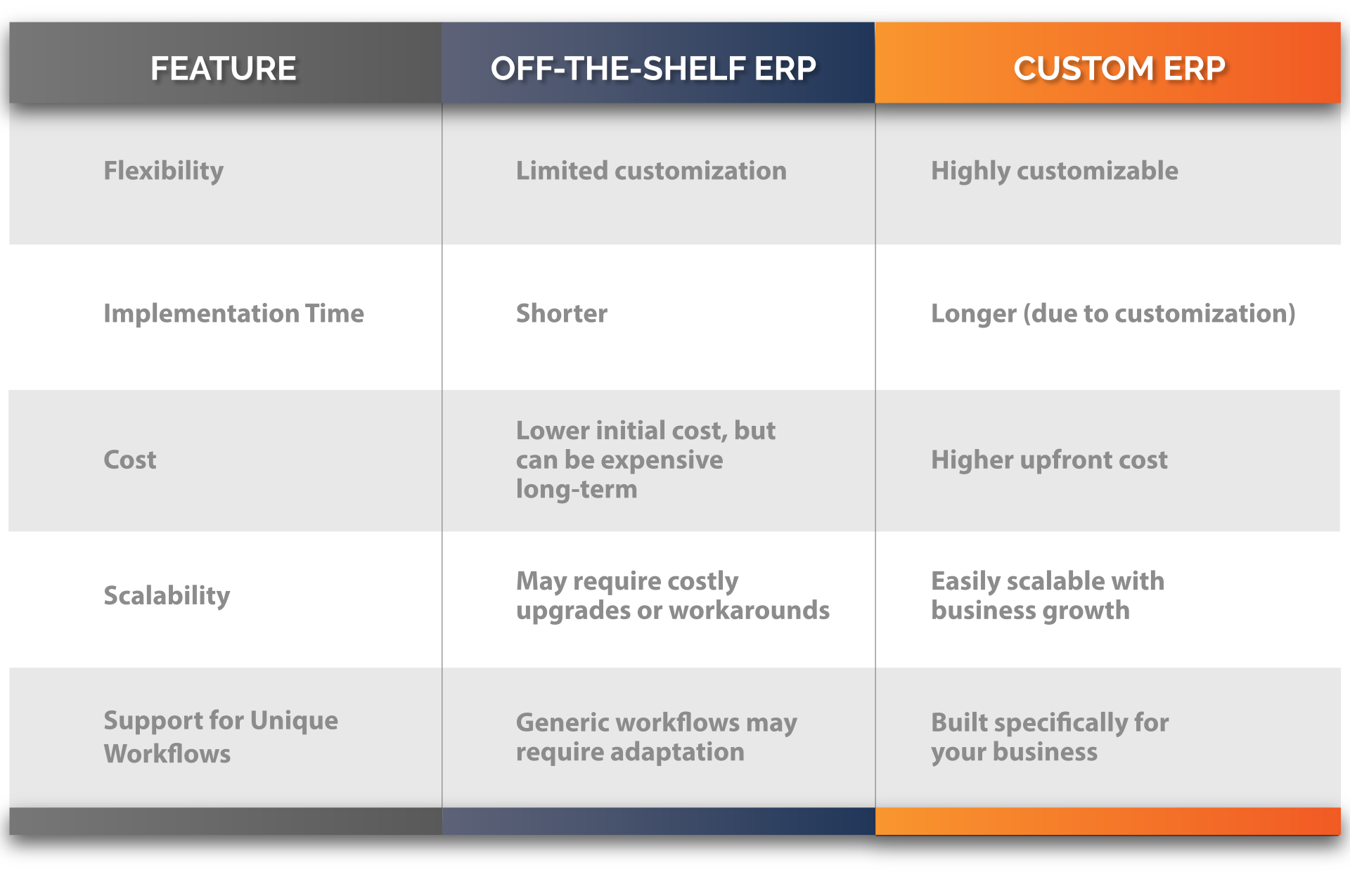
When comparing standard and custom solutions, it helps to examine custom ERP use cases versus the limitations of off-the-shelf systems. Tailored platforms often require fewer workarounds and better support unique operational needs. For a deeper look at how that plays out in practice, see our breakdown of custom ERP tailored solutions for your business.
Key Differences:
How Custom ERP Supports Growth
Understanding how custom ERP works reveals its role in operational strategy. Tailored systems improve workflows and enable ongoing innovation:
Automation of Complex Tasks
Automating specific processes frees teams to focus on strategic initiatives. Our custom ERP software guide covers how automation workflows reduce manual overhead across departments.
Enhanced Stakeholder Experiences
Centralized data supports personalized interactions with customers, students, or clients.
Informed Decision-Making
Real-time reporting provides the insights needed for data-driven choices.
Advanced Technology Integration
Integrating AI and machine learning into tailored ERP platforms. According to Gartner, ERP tools share a common process and data model covering broad and deep end-to-end processes across finance, HR, distribution, manufacturing, and supply chain — making integration the core value of any ERP investment.
ERP Implementation Process Overview
- Assess Workflow Needs: Map current processes to pinpoint improvement areas.
- Choose an Experienced Team: Partner with developers familiar with your industry’s requirements.
- Collaborative Design: Build a system reflecting your daily operations and growth plans.
- Testing & Training: Pilot the solution with key users and provide in-depth onboarding.
- Deploy & Support: Launch the system and continue refining with regular updates and maintenance.
Custom ERP Use Cases by Industry
Review custom ERP use cases across sectors:
- Manufacturing: Optimize production scheduling and supply chain visibility.
- Healthcare: Streamline patient records, billing, and compliance workflows.
- Retail: Enhance inventory management, sales analytics, and customer service.
- Education: Manage student enrollment, course scheduling, and faculty operations.
- Construction: Coordinate project timelines, financial tracking, and on-site logistics.

How to Choose a Custom ERP Vendor
Not all custom ERP vendors are built the same. The platform matters, but so does the team behind it and the process they use to build your system. Here are the most important things to evaluate before you commit.
They Should Start With Your Workflows, Not Their Template
A genuine custom ERP vendor spends significant time understanding how your business actually operates before writing a single line of configuration. If a vendor jumps straight to a demo without asking deep questions about your processes, that’s a sign their “custom” solution is really just a pre-built platform with your logo on it.
No-Code or Low-Code Flexibility Matters Long-Term
Your business will change after implementation. Make sure the platform is built so your team can adjust workflows, add modules, and update configurations without going back to the vendor every time. A no-code foundation means you stay in control as you grow.
Look for a Modular Architecture
You should only pay for and implement what your business needs right now. A modular ERP lets you start with the core functions that matter most and add capabilities over time. Avoid vendors who require you to take the whole platform upfront.
Integration Capability Is Non-Negotiable
Your ERP needs to work with the tools you already rely on. Before signing anything, confirm the vendor has a clear integration strategy for your existing tech stack including your CRM, accounting software, and any industry-specific tools. Read more on how to make your ERP work smarter with custom events.
Ask About Post-Implementation Support
The implementation is only the beginning. A good vendor stays involved after go-live to help you refine the system, train new team members, and adapt as your needs evolve. Ask specifically what support looks like after the project closes.
Verify Real Customer Results
Ask for case studies and references from businesses similar to yours in size and complexity. A vendor confident in their work will have no hesitation putting you in touch with existing customers.
Is Custom ERP Right for Your Business?
Custom ERP is not the right fit for every business at every stage. But for companies that have outgrown spreadsheets and disconnected tools, are losing time to manual processes, or find themselves constantly working around their current software, it’s worth a serious look.
The businesses that get the most out of custom ERP software tend to share a few things in common. Their workflows are specific enough that generic platforms require constant workarounds. They’re growing fast enough that scalability matters. And they’ve reached a point where the cost of doing nothing — in lost time, errors, and missed opportunities — outweighs the investment in a system built for how they actually operate.
FAQ
1. What is custom ERP software?
Custom ERP software is an enterprise resource planning system built specifically around an organization’s unique processes and requirements. Rather than forcing your workflows to adapt to a generic tool, it molds to your business and enables smoother operations from day one. Unlike legacy software that comes loaded with features most SMBs will never use, a custom ERP gives you exactly what you need and the flexibility to grow and change over time.
2. What are the benefits of custom ERP software?
The benefits of custom ERP software include improved operational efficiency, cost control, and customized reporting. Because the system is built around your existing workflows, teams spend less time on manual workarounds and data entry errors. You only pay for the modules your business actually needs, and reporting is configured to your specific KPIs so decision-makers get actionable data instead of irrelevant dashboards.
3. How long does ERP implementation take?
A typical ERP implementation timeline varies based on the size and complexity of your business, but most SMB deployments range from 6 to 12 weeks. The process moves through four phases: workflow assessment, system design, testing and training, and final deployment. Simpler implementations with fewer custom modules can move faster, while businesses with more complex operations or integrations will need more time to get it right.
4. Can custom ERP integrate with other systems?
Yes, custom ERP software is built to integrate with the tools your business already relies on. Common integrations include CRM platforms, HR systems, accounting software, ecommerce platforms, and third-party data sources. Because the system is custom built, integrations are designed to fit your specific tech stack rather than forcing you to work around limitations of a pre-packaged solution.
Conclusion
This article covered what the benefits of custom ERP software is, key features, implementation steps, and real-world use cases. By focusing on insights like ERP scalability, best practices and process automation, you can make informed decisions about adopting a tailored ERP solution that grows with your organization. Contact us if you’d like to learn more!
Watch Your First AI Workflow Come to Life
In this 15 minute 1-on-1 session, we will map out your most frustrating manual process and build a functional AI automation prototype right in front of you.