
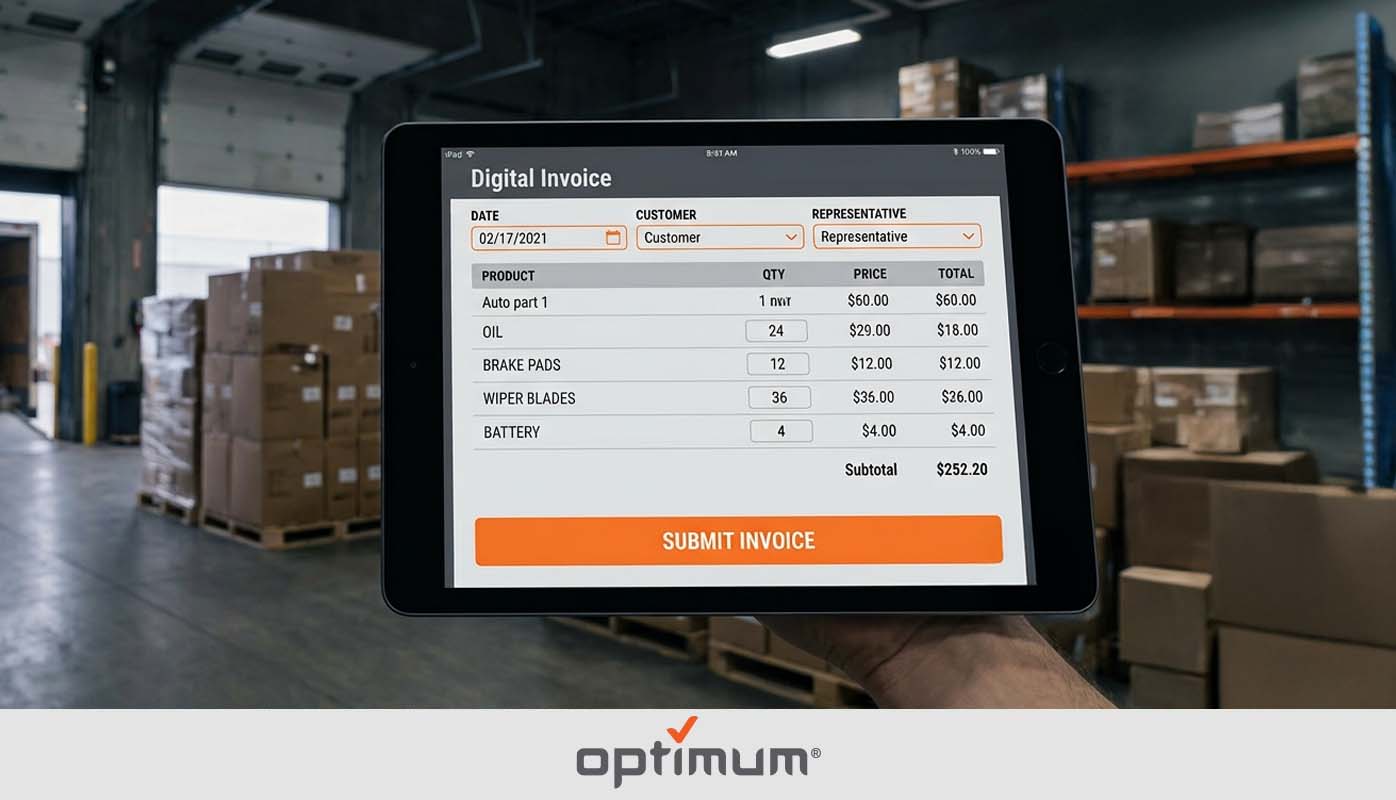
Automated invoicing software is not what most distributors think it is. The version being sold to finance departments and AP teams, the one that scans PDFs and routes approvals through an inbox, has nothing to do with a route rep writing an invoice on a tablet in a shop parking lot. That is the problem this post is about. Hand-written invoices crumpled in a truck cab. Stacks of paper that someone back at the office has to decipher, enter, and reconcile days after the sale already happened. By the time that invoice reaches accounting, the rep is three stops ahead and the books are already running behind. Automated invoicing software built for distributors fixes that at the source, not in the back office.
Key Takeaways
- Automated invoicing software for distributors is field invoicing, written at the stop and synced instantly the moment it is done.
- Paper invoices create a delay between the sale and the book entry that compounds every day.
- One missed or misread invoice corrupts the ledger for the period.
- Real-time invoicing means accounting sees every transaction as it happens, not the next morning.
- Month-end close gets faster because the data is already clean and current before the period ends.
What Is Automated Invoicing Software?
Automated invoicing software is a platform that replaces the manual creation, entry, and reconciliation of invoices with a system that handles those steps automatically. For a distributor, that means a rep writes an invoice on a tablet at the stop and the system posts it directly to your accounting before the rep pulls out of the parking lot. No paper. No re-entry. No waiting until someone back at the office gets to the stack on their desk.
Most automated invoicing tools are built for accounts payable teams, scanning vendor invoices and routing them for approval. That is a completely different problem than what a route-based distributor faces. What distributors need is field invoicing that syncs to accounting in real time — written at the stop, not processed at a desk.
Automated invoicing software built for distributors starts at the point of sale on the route, not in the inbox of an AP clerk. The invoice is created in the field, posted to the system, and synced to your books as a single seamless action. The back office does not need to touch it.
Why Manual Invoicing Breaks Down for Distributors
Most distributors start with paper invoices because they are simple. A rep writes it up, gives the customer a copy, keeps a copy, and brings it back at the end of the day. It works until volume increases, routes get longer, or the person responsible for entering invoices into the system gets behind. At that point, the whole process starts to crack.
Manual base cost
Automated invoicing
Cumulative weekly invoice processing cost across 500 invoices. Source: Resolve
Paper Invoices Get Lost Between the Truck and the Office
A paper invoice lives in a truck cab, a jacket pocket, or a folder that gets left on the seat. According to research from Resolve, 39 percent of manually processed invoices contain errors that lead to payment delays and additional labor costs. For a distributor running dozens of stops a day, that error rate is not a statistic. It is exactly the problem automated invoicing software is built to eliminate.
Days of Delay Between the Sale and the Book Entry
When invoices come back to the office at the end of the day, the gap between when the sale happened and when it appears in your books can stretch to days. Cash flow decisions, customer balance checks, and inventory reconciliation all happen on information that is already out of date. The operation keeps moving. The books do not.
One Missed Invoice Corrupts the Whole Month
A paper invoice that gets lost or entered with an error does not announce itself. It shows up at month-end reconciliation when the numbers do not add up and someone has to go back through every transaction to find the gap. The cost is not just the time. It is the decisions made on incomplete information while the close is still in progress.
Your Accountant Is Always Working Off Stale Data
If your accounting team is entering invoices from paper at the end of the day, they do not know what the business actually looks like right now. They know what it looked like when the last batch was entered. For a distributor making decisions about credit limits, collections, and cash flow, that lag is a structural visibility problem that affects every financial decision the business makes during the day.
What Automated Invoicing Software Actually Does for Distributors
Automated invoicing software built for distribution replaces every manual step between the point of sale and the accounting entry with a single automated action. Here is what that looks like in practice.
Invoices with errors (39%)
Invoices processed correctly (61%)
Manually processed invoices containing errors. Source: Resolve
Invoice Written at the Stop, Posted Instantly
A rep pulls up to a stop, writes the invoice on a tablet, and submits it. The invoice posts to the system and syncs to QuickBooks before the rep starts the truck. There is no paper version. There is no re-entry. With automated invoicing software, the accounting record exists the moment the transaction closes, not the next morning when someone gets to the stack.
No Paper, No Re-Entry, No Delay
The back office does not receive invoices to enter. They receive confirmation that invoices have already been entered. The entire manual handoff disappears. Nobody types from a crumpled paper copy. Nobody tries to read a rep’s handwriting under a deadline. The invoice is created once, in the field, and it is correct because the rep is standing in front of the customer when it is written.
Returns and Credits Processed the Same Way
A return processed at a stop syncs to the system the same way a sale does. The credit is recorded in real time and the customer balance updates immediately. There is no separate manual process for handling returns at the office. Every transaction type flows through the same automated path.
Month-End Close in Hours, Not Days
Because every invoice, return, and credit posts in real time, the books are current every day. Month-end close is not a process of assembling a month’s worth of paper and entering it into the system. It is a confirmation that what is already in the system is accurate. That is what automated invoicing software makes possible — a close that takes hours instead of days because the data has been clean all month.
How to Know If You Need It
Not every distributor is at the same breaking point with manual invoicing. But these four signals tell you the paper process has already become a liability.
4-7 reps
8-12 reps
13+ reps
Invoice turnaround time vs customer dispute rate by team size
Your Reps Are Still Writing Paper Invoices on Route
If your reps are writing invoices by hand at every stop, the risk of errors, lost invoices, and illegible entries is built into every single transaction your business processes. That is not a workflow. It is a liability that compounds every day the routes run.
Someone at the Office Is Re-Entering Invoices Manually
If there is a person whose job includes typing invoice data from paper into the accounting system, that person is a single point of failure for your accounting accuracy. When they are sick, behind, or distracted, the books fall behind. When they make a data entry error, it does not show up until reconciliation.
Your Books Are Never Current During the Day
If your accounting team cannot tell you what today’s sales look like right now, you have a visibility problem that affects every financial decision made during the day. Automated invoicing software means the answer is always current because invoices post in real time as reps close their stops.
Month-End Takes Days to Reconcile
If your team spends two, three, or four days at month-end chasing invoices, correcting entry errors, and reconciling what was sold against what was entered, the manual process is the source of that pain. A clean automated invoicing system means the books are already reconciled before the period ends.
How Optimum Handles Automated Invoicing for Distributors
Optimum’s automated invoicing is built specifically for route-based distribution, not for AP departments processing vendor invoices. A rep writes an invoice on a tablet at the stop, and it posts directly through Optimum’s QuickBooks integration before they leave the parking lot. Every invoice, return, and credit flows through the same automated path. There is no paper handoff, no re-entry at the office, and no delay between the transaction and the book entry.
The system connects to the full distribution management platform, so the invoice a rep writes at a stop reflects current pricing, inventory, and customer balances at the moment it is written. According to McKinsey’s research on source-to-pay automation, companies waste 3 to 4 percent of their overall external spend on inefficiency from manual processes. For a distributor running hundreds of invoices a week, automated invoicing software eliminates that drag at the source.
Manual invoice processing costs between $15 and $16 per invoice. Automated systems bring that to as low as $3. For a distributor processing 500 invoices a week, that difference compounds fast before you factor in the time saved on re-entry and the month-end closes that take hours instead of days.
FAQ
What is automated invoicing software?
Automated invoicing software is a platform that replaces manual invoice creation, entry, and reconciliation with a system that handles those steps automatically. For distributors, it means invoices are written in the field on a tablet and posted in real time, not hand-written on paper and entered at the office the next day.
How does automated invoicing work for route-based distributors?
A rep writes the invoice at the stop on a tablet, products, quantities, prices, customer information, and submits it. The system posts it automatically. The back office sees it the moment it is written. There is no paper, no re-entry, and no delay between the sale and the book entry.
How does automated invoicing sync with QuickBooks?
Through a direct integration between the distribution management system and QuickBooks. Every invoice posts in real time as it is written in the field. Returns and credits follow the same path. The result is a clean ledger that reflects the operation as it actually happened, not as it was entered by someone at the office the following morning.
What’s the difference between field invoicing and AP automation?
AP automation handles vendor invoices coming into a business, scanning, routing for approval, and matching against purchase orders. Field invoicing handles customer invoices going out from a distribution business at the point of sale. They solve completely different problems for completely different buyers. Optimum is field invoicing built for distributors.
How long does it take to set up automated invoicing?
Setup time depends on the complexity of the operation and the number of routes and reps being onboarded. Optimum is built specifically for distributors and is designed to go live without a lengthy implementation project. Most distributors are processing invoices in the field within days of setup.
Automated invoicing software built for distributors is not a back office upgrade. It is a field operation upgrade. When invoices write themselves to your books the moment a rep closes a stop, the paper goes away, the re-entry goes away, and the lag goes away. The books finally reflect what is actually happening in the operation. That is what route-based distribution automation actually delivers, not a better way to process vendor invoices, but a better way to run every stop on every route, every day.
Watch Your First AI Workflow Come to Life
In this 15 minute 1-on-1 session, we will map out your most frustrating manual process and build a functional AI automation prototype right in front of you.