

QuickBooks spreadsheet sync is how most distributors handle their accounting handoff — and it is costing them more than they realize. Every day ends the same way: someone exports a spreadsheet, emails it to accounting, and hopes nothing got missed between the last route close and the upload. By the time the data lands in QuickBooks, it is already hours old. By the time someone catches an error, it is days old. This post is about what that process is actually costing you and what real-time integration looks like instead.
Key Takeaways
- Manual QuickBooks spreadsheet sync means your books are always running behind your operation.
- One missed export or import error can corrupt your entire ledger for the period.
- Real-time integration writes every transaction to QuickBooks the moment it happens — no manual steps.
- Accounting gets live visibility instead of a daily dump.
- Reconciliation stops being a month-end event and starts happening continuously.
What Is QuickBooks Spreadsheet Sync?
QuickBooks spreadsheet sync is the process most distributors use when their distribution software and QuickBooks do not talk directly to each other. At the end of a shift, a route, or a day, someone exports transaction data from the distribution system into a spreadsheet — usually a CSV — and then imports it into QuickBooks manually. Sometimes that import is automated by a scheduled task. Most of the time it is a person.
The process exists because most distribution software was not built with accounting integration in mind. The two systems run in parallel, and the spreadsheet is the bridge. It works well enough when transaction volume is low and the team is disciplined. It starts to break down the moment either of those things stops being true. And for a distributor that has been growing, one or both of those conditions is almost certainly no longer true.
QuickBooks spreadsheet sync is not a failure of effort — it is a structural limitation. The spreadsheet is a snapshot of what happened up to a point in time. Everything after that point is invisible to accounting until the next export runs. For a distributor running ten routes a day, that window represents thousands of dollars in transactions that accounting cannot see until tomorrow.
Why Manual Spreadsheet Sync Breaks Down
Most distributors have been running QuickBooks spreadsheet sync long enough that the pain feels normal. It is not normal. It is a process with four specific failure modes that compound over time.
Real-time integration
Average hours per week spent on data entry and reconciliation. Source: SimplyDepo
End-of-Day Batching Means Your Books Are Always Behind
When transactions only reach QuickBooks once a day, your accounting is perpetually running 12 to 24 hours behind your operation. A sale that happened at 8am does not exist in QuickBooks until that evening’s export. A return processed at noon is invisible to accounting until tomorrow. The books are never current because the process is designed to batch rather than stream. According to research from SimplyDepo on distribution operations, businesses spend an average of 25 hours a week on manual data entry and reconciling data across apps — time that compounds every week across the life of the operation.
One Missed Export Corrupts the Whole Ledger
QuickBooks spreadsheet sync has a single point of failure: the export. If the export does not run — because the person who does it was out sick, because the file got corrupted, because the scheduled task failed silently — the gap does not show up as an error. It shows up as missing data at month-end, when someone finally tries to reconcile and the numbers do not add up. Finding the missing period and reconstructing it is a multi-day project that no one has time for. And it happens more often than most distributors want to admit.
Someone Has to Do It — and They Forget
Manual processes require a person. People get busy, sick, interrupted, and distracted. The more the QuickBooks spreadsheet sync depends on a specific person doing a specific thing at a specific time, the more fragile the whole accounting operation becomes. Distributors that have grown past a handful of routes find that the daily sync becomes a bottleneck — and when it slips, the downstream effects accumulate quietly until they surface as a crisis.
No Visibility Until the Next Morning
If your CFO or accounting team wants to know where the operation stands right now, the honest answer under a manual sync model is that they cannot know. They can see what was true as of last night’s import. They cannot see what happened today. That visibility gap affects cash flow decisions, invoice timing, and any situation where real-time financial position matters — which is most situations that actually matter. A decision made on yesterday’s numbers is a decision made with incomplete information.
What Real-Time QuickBooks Integration Actually Does
Real-time QuickBooks integration eliminates the spreadsheet entirely. Instead of batching transactions into a file and importing them on a schedule, every transaction writes directly to QuickBooks the moment it happens in the distribution system. Here is what that looks like in practice.
Every Transaction Writes to QuickBooks the Moment It Happens
A sale closes on a route. QuickBooks records it instantly. A return is processed. QuickBooks reflects it immediately. A payment comes in. It posts in real time. There is no lag, no batch window, no waiting for tonight’s export. The accounting record and the operational record are the same record, updated at the same time. For a team running multiple reps across multiple routes, that means every single transaction is accounted for the moment it happens — not at the end of the day.
No Manual Exports, No CSV Uploads, No Email Attachments
The entire manual handoff disappears. Nobody exports a file. Nobody imports a file. Nobody emails a spreadsheet to accounting. The data moves automatically through a direct integration, and the only thing anyone has to do is run the operation. The accounting takes care of itself. That is not a minor efficiency gain — it is the elimination of an entire category of work that has been eating time and introducing risk every single day.
Accounting Sees It Live, Not Tomorrow
Your accounting team has the same real-time view of the operation as your ops team. They can see invoice totals, payment receipts, and transaction activity as it happens — not as it was reported last night. That visibility changes how they work. Questions that used to require a call to the field get answered by looking at the screen. Cash flow decisions get made on current data instead of yesterday’s snapshot. And when a discrepancy appears, it gets caught immediately instead of at month-end.
Reconciliation Happens Automatically
Because every transaction posts in real time, there is nothing to reconcile at month-end that has not already been reconciled continuously throughout the month. The books reflect reality every day. Close gets faster because the data is already clean and current before the period ends. For distributors that currently spend three or four days closing the books, that alone is a significant operational improvement.
How to Know If You Need It
Not every distributor feels the pain of QuickBooks spreadsheet sync the same way. But these four signals tell you the manual process has already become a liability.
Real-time integration
Operational impact — manual spreadsheet sync vs real-time integration
You’re Still Emailing Spreadsheets to Your Accountant
If the daily accounting handoff involves an email with a CSV attached, you are one missed email away from a gap in your books. That is not a workflow — it is a risk. And the longer the operation runs on that risk, the more likely it is that the gap eventually shows up at the worst possible time.
Month-End Close Takes Days Instead of Hours
If your team spends two, three, or four days at month-end reconciling transactions and tracking down discrepancies, the QuickBooks spreadsheet sync process is the source of that pain. Clean books close fast. Books assembled from daily imports close slowly.
Your Books Are Never Current During the Day
If someone asks right now what today’s sales look like in QuickBooks and the answer is we will know tonight, you have a visibility problem. Real-time integration means the answer is always available immediately.
Errors Only Surface at Reconciliation
If the first time you find out something went wrong with the data is during month-end reconciliation, the manual sync process is hiding errors until they are expensive to fix. Real-time integration surfaces discrepancies the moment they occur — when they are still cheap to correct.
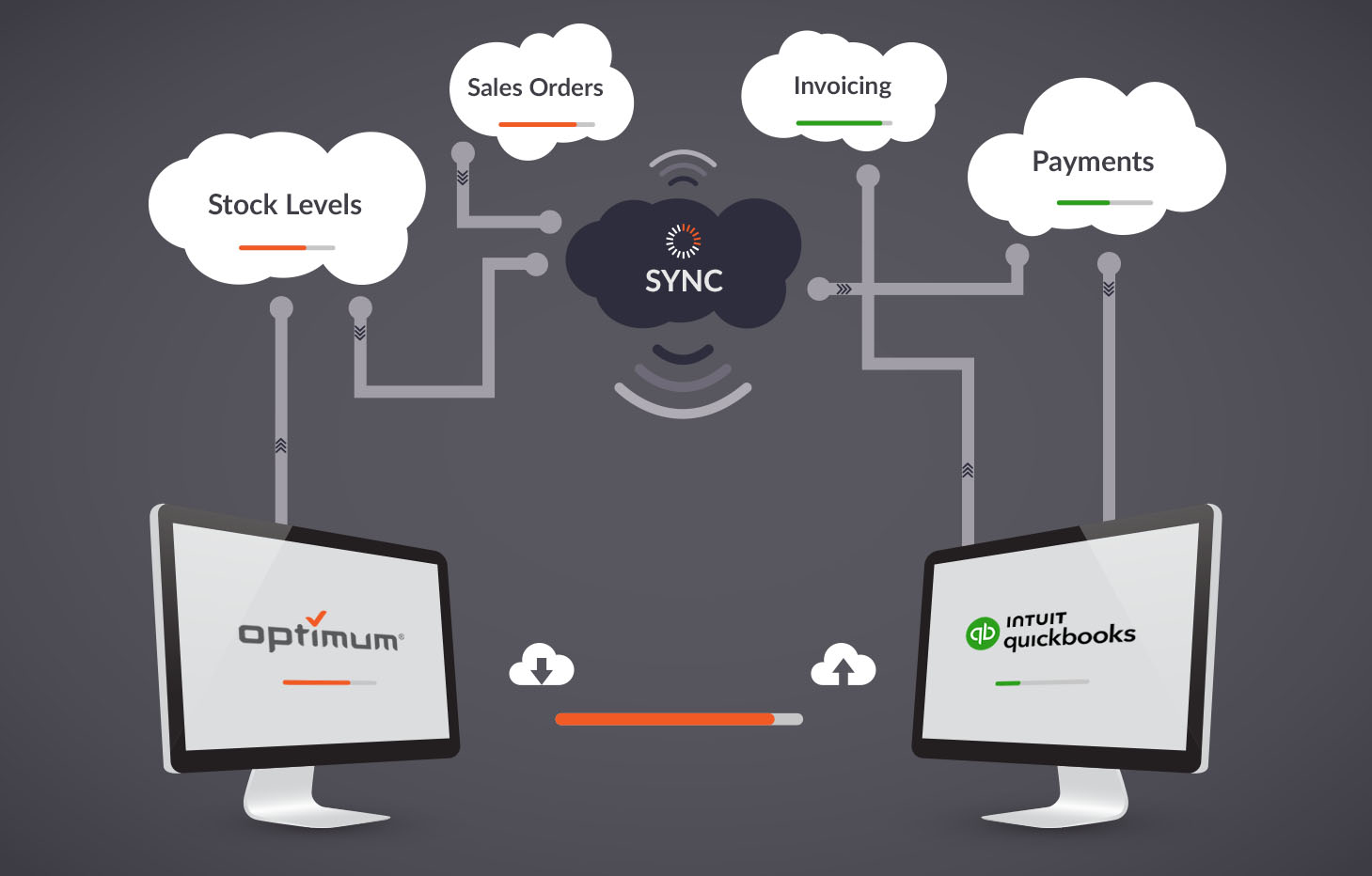
How Optimum’s QuickBooks Integration Works for Distributors
Optimum’s QuickBooks integration is built specifically for how distributors operate — not how retail or e-commerce businesses do. Every transaction that runs through the distribution management system posts directly to QuickBooks in real time. Sales, returns, payments, adjustments, and SPIFF payouts all write to QuickBooks the moment they happen in Optimum, without any manual export, import, or file transfer in between.
The integration connects directly to your existing QuickBooks account. There is no middleware to manage and no scheduled sync to monitor. When a rep closes a sale in the field, QuickBooks reflects it before the rep drives to the next stop. When accounting wants to see where the day stands, they look at QuickBooks and what they see is current. According to Intuit’s QuickBooks integrations documentation, eliminating manual data entry is the core value of any direct integration — and for distributors running high transaction volumes across multiple reps and routes, that value compounds every single day.
For distributors managing multiple locations, the integration handles all sites from a single connection. One QuickBooks file. Every location. Every transaction. All in real time. There is no need to manage separate imports for each site or reconcile data across multiple files at month-end. The consolidation happens automatically as the operation runs.
The practical difference shows up on the first day the integration goes live. The person who used to spend 30 minutes every evening exporting and importing the day’s data does not have to do that anymore. The accounting manager who used to wait until the next morning to see what the previous day looked like checks the screen instead of waiting for an email. And the CFO who used to see month-end as a week-long reconciliation project starts seeing it as a two-day close — because the work has been happening continuously all month, automatically, without anyone having to think about it.
FAQ
What is QuickBooks spreadsheet sync?
QuickBooks spreadsheet sync is the manual process distributors use when their distribution software does not connect directly to QuickBooks. Transaction data is exported to a spreadsheet — typically a CSV — and then imported into QuickBooks on a schedule, usually once a day. It works as a workaround but creates a persistent lag between what is happening in the operation and what accounting can see.
How does real-time QuickBooks integration work for distributors?
Real-time integration connects your distribution system directly to QuickBooks through an API. Every transaction — sales, returns, payments, adjustments — writes to QuickBooks the moment it happens in the distribution system. There is no export, no import, and no manual step. The accounting record updates automatically in real time as the operation runs.
What’s the difference between manual sync and direct integration?
Manual QuickBooks spreadsheet sync requires a person or scheduled task to export data, format it, and import it into QuickBooks on a delay. Direct integration eliminates all of those steps. Transactions post automatically, in real time, without any human intervention. The result is accounting that is always current instead of always running behind.
How long does it take to set up QuickBooks integration?
Setup time depends on the complexity of your operation and the platform you are integrating with. Optimum’s QuickBooks integration is designed for distributors and connects to your existing QuickBooks account without a lengthy implementation project. Most distributors are running live within days rather than weeks.
Does QuickBooks integration work across multiple locations?
Yes. Optimum’s integration handles multi-location operations from a single QuickBooks connection. Every location’s transactions post to the same QuickBooks file in real time, giving accounting a unified view of the entire operation without managing separate imports for each site.
QuickBooks spreadsheet sync is a workaround that most distributors have been living with long enough that it feels like the way things work. It is not the way things work — it is the way things worked before real-time integration existed. When every transaction posts to QuickBooks the moment it happens, the daily export disappears, the month-end scramble gets shorter, and accounting finally has the same view of the operation that the ops team does. That is what direct integration actually delivers — and it is available right now, not someday.
Watch Your First AI Workflow Come to Life
In this 15 minute 1-on-1 session, we will map out your most frustrating manual process and build a functional AI automation prototype right in front of you.